
Invoice formats in Excel (.xlsx) with working formulas for line amounts, GST, round off and grand total. Free GST and simple versions, the formulas explained, and how to use them.
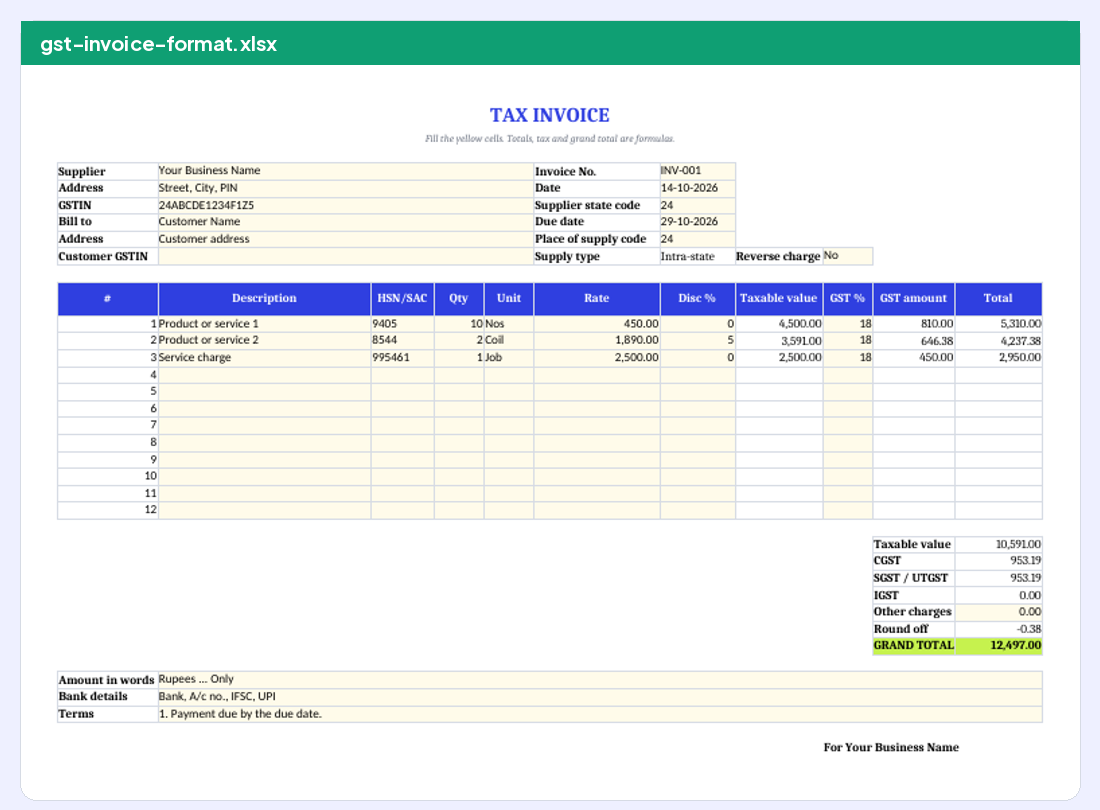
Download the invoice format in Excel
Formulas inside the template
The GST sheet uses these formulas. If you build your own, copy them.
| Cell | Formula | What it does |
|---|---|---|
| Taxable value (H) | =ROUND(D*F*(1-G/100),2) | Qty x rate, less discount % |
| GST amount (J) | =ROUND(H*I/100,2) | Taxable value x GST % |
| Line total (K) | =H+J | Taxable value plus tax |
| CGST | =IF(state=pos, SUM(J)/2, 0) | Half the tax when supply is in your state |
| IGST | =IF(state=pos, 0, SUM(J)) | Full tax when supply is to another state |
| Grand total | =ROUND(sum,0) | Rounded to the nearest rupee |
| Round off | =ROUND(sum,0)-sum | Shows the rounding difference |
Excel has no built-in number to words function. Type the amount in words, or make the invoice in the online maker which writes it for you in lakh and crore or million style.
How to use the Excel invoice
- Enter your details once. Business name, address, GSTIN and state code. Save the file as your master copy.
- For each invoice, save a copy. Name it with the invoice number, for example INV-001.xlsx.
- Fill only yellow cells. Items, quantities, rates, discount and GST %.
- Check the place of supply code. The supply type cell shows intra-state or inter-state.
- Export as PDF. File, Save As (or Export), PDF, then send.
Common Excel invoice problems
Do
- Copy the last item row down to add rows, so formulas follow.
- Protect the sheet (Review, Protect Sheet) with only yellow cells unlocked.
- Keep a separate sales register sheet listing every invoice.
Avoid
- Do not type over formula cells.
- Do not merge cells inside the item table.
- Do not round each line differently from the total.
Prefer a form?
Frequently asked questions
Does the Excel invoice work in Google Sheets?
Yes. Upload it to Google Drive and open with Google Sheets. All formulas used are standard.
Can I keep many invoices in one Excel file?
You can add a sheet per invoice, but one file per invoice plus a register sheet is easier to search and send.
How do I change the GST rate?
Type the rate in the GST % column for that line. Each line can have its own rate.
Checked and updated 14 Oct 2026. Independent template site; not tax or legal advice.