
Salary slip format in Excel with formulas for gross earnings, total deductions and net pay, plus a monthly salary sheet for all employees. Free .xlsx downloads.
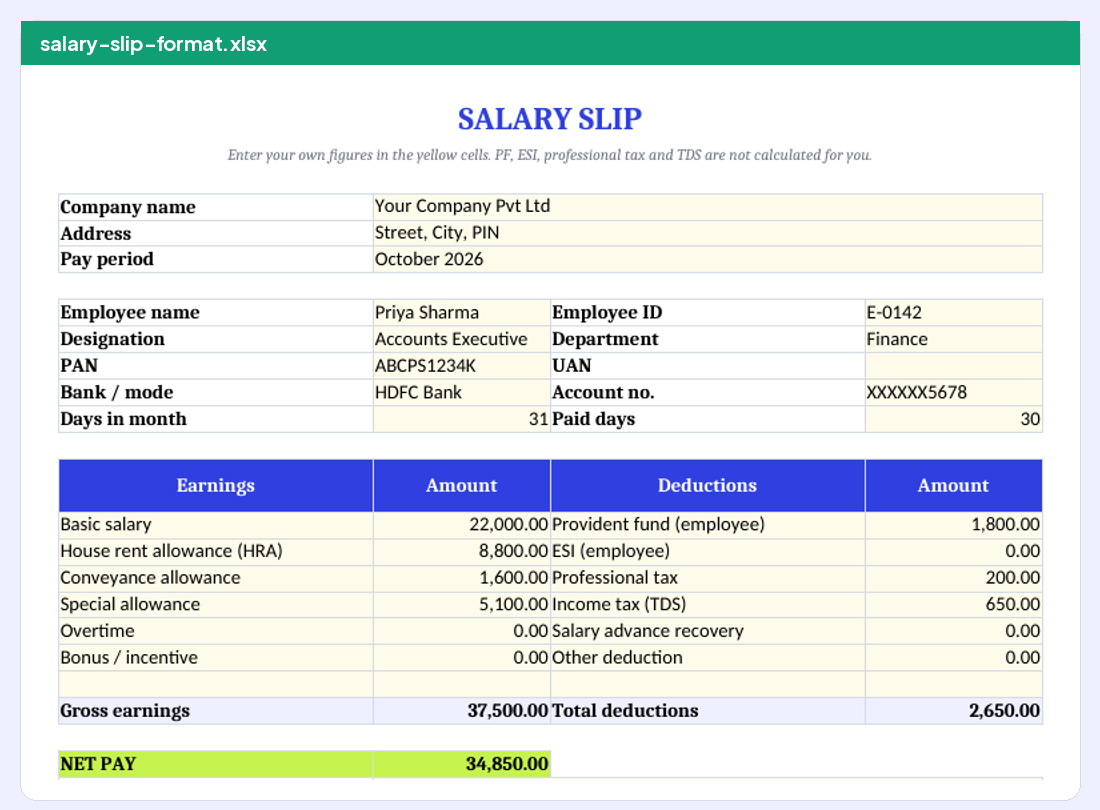
Download
Formulas used
| Cell | Formula | Purpose |
|---|---|---|
| Gross earnings | =SUM(B16:B22) | Adds all earnings |
| Total deductions | =SUM(D16:D22) | Adds all deductions |
| Net pay | =B23-D23 | Gross minus deductions |
| Salary sheet gross | =SUM(E4:G4) | Basic + HRA + other allowances |
| Salary sheet net | =H4-SUM(I4:K4) | Gross minus PF, PT, TDS |
To pay for actual days worked, many employers prorate: earned basic = monthly basic x paid days / days in month. Add a column with =ROUND(Basic*PaidDays/DaysInMonth,0) if you use that method.
Fill it in 5 steps
- Save a master copy.
- Enter company and employee details. Yellow cells only.
- Enter earnings and deductions. Use figures from your payroll.
- Check net pay. It must match the bank transfer.
- Save as PDF. File, Export or Save As, PDF.
Sample output
SALARY SLIP FOR OCTOBER 2026
Aarav Electricals Pvt Ltd
14, Sunrise Complex, CG Road, Ahmedabad 380009
| Employee name | Priya Sharma | Employee ID | AE-0142 |
| Designation | Accounts Executive | Department | Finance |
| Date of joining | 12 Jun 2023 | PAN | ABCPS1234K |
| UAN | 100000000000 | Bank A/c | XXXXXX5678 |
Days in month: 31 Paid days: 30
| Earnings | Amount | Deductions | Amount |
|---|---|---|---|
| Basic salary | 22,000.00 | Provident fund | 1,800.00 |
| House rent allowance | 8,800.00 | Professional tax | 200.00 |
| Conveyance allowance | 1,600.00 | Income tax (TDS) | 650.00 |
| Special allowance | 5,100.00 | ||
| Gross earnings | 37,500.00 | Total deductions | 2,650.00 |
Net pay: ₹34,850.00
Net pay in words: Rupees Thirty Four Thousand Eight Hundred Fifty Only
Authorised signatory
Monthly salary sheet for all employees
The second file is a salary register: one row per employee with paid days, Basic, HRA, other allowances, gross, PF, professional tax, TDS and net pay. Totals at the bottom give the month’s payroll cost and the bank transfer total. Many small businesses keep one register per month and generate individual slips from it.
| # | Employee | Gross | PF | PT | TDS | Net pay |
|---|---|---|---|---|---|---|
| 1 | Employee 1 | 23,000 | 1,800 | 200 | 0 | 21,000 |
| 2 | Employee 2 | 24,000 | 1,800 | 200 | 0 | 22,000 |
| Total | 47,000 | 3,600 | 400 | 0 | 43,000 |
Adding your own components
- Insert a row inside the earnings block. The SUM formula grows automatically when you insert inside the range.
- Name the component. For example Night shift allowance.
- Enter the amount. The gross and net update.
- For a new deduction, insert in the deductions column the same way.
Common Excel salary slip errors
Do
- Insert rows inside the totalled range.
- Format amounts with two decimals.
- Lock the sheet before sharing.
Avoid
- Do not paste values over the net pay formula.
- Do not round each component differently from payroll.
- Do not send the editable .xlsx to employees; send PDF.
Frequently asked questions
Does the Excel file calculate PF and ESI?
No. Enter the amounts from your payroll. Statutory rates and ceilings change and depend on the employee.
Can I make slips for many employees?
Use the salary sheet for the monthly register, then copy each row into the slip or generate each slip online.
Can Excel write net pay in words?
Not without a macro. The online generator writes it for you.
Checked and updated 14 Oct 2026. Independent template site; not tax or legal advice.